ReactJS Tutoral
ReactJS
React is a free and open-source front-end JavaScript library which is used to develop various interactive user-interfaces. It is a simple, feature rich and component based UI library. When we say component based, we mean that React develops applications by creating various reusable and independent codes. This UI library is, thus, widely used in web development.
React can be used to develop small applications as well as big, complex applications. React provides minimal and solid feature set to kick-start a web application. React community compliments React library by providing large set of ready-made components to develop web application in a record time. React community also provides advanced concept like state management, routing, etc., on top of the React library.
Why Learn ReactJS?
- Ease of Use: ReactJS does not require writing lengthy codes as it supports the Components concept so a small amount of code can be created and can be used in multiple places.
- Multiple Module Support: There are so many modules in ReactJS that can be used to make your development more scalable, and manageable at a fast pace.
- Multiple Apps Development: By using React knowledge we can create Web Pages, Web Apps, Mobile Apps, and VR Apps. There are a lot of websites that are using ReactJS like Airbnb, Cloudflare, Facebook, Instagram, etc.
- Easy Migration: Because of its easy learning curve migration from other technologies became so easy. There are tons of resources to learn ReactJS from basics to advanced.
- Large Community: ReactJS has one of the largest communities to help you when you are in trouble debugging your codes or get stuck learning new things.
What is the need for React?
Component Based − React makes use of multiple components to build an application. These components are independent and have their own logic which makes them reusable throughout the development process. This will drastically reduce the application's development time.
Better and Faster Performance − React uses Virtual DOM. Virtual DOM compares the previous states of components of an application with the current states and only updates the changes in Real DOM. Whereas, conventional web applications update all components again. This helps React in creating web applications faster.
Extremely Flexible − React allows developers and teams to set their own conventions that they deem are best suited and implement it however they see fit, as there are no strict rules for code conventions in React.
Creates dynamic applications easily − Dynamic web applications require less coding while offering more functionality. Thus, React can create them easily.
Develops Mobile Applications as well − Not only web applications, React can also develop mobile applications using React Native. React Native is an open-source UI software framework that is derived from React itself. It uses React Framework to develop applications for Android, macOS, Web, Windows etc.
Debugging is Easy − The data flow in React is unidirectional, i.e., while designing an app using React, child components are nested within parent components. As the data flows is in a single direction, it gets easier to debug errors and spot the bugs.
Features of ReactJS
- Virtual DOM: Virtual DOM is a special kind of DOM that is used in ReactJS. Virtual DOM represents the real DOM of the current HTML document. Whenever there is a change in the HTML document, React checks the updated virtual DOM with the previous state of the Virtual DOM and updates only the difference in th actual/real DOM.
- Reusable Components: Components need to be written a single time and can be used multiple times by just calling that component where we require that component.
- One-Way Data Binding: One-way data binding prevents the data in a component from flowing backward. A component can pass the data to its child component only. This will simplify the data handling and reduce the complexity.
Applications
Facebook, popular social media application − React was originally developed at Facebook (or Meta), so its only natural that they use it to run their application. As for their mobile application, it uses React Native to display Android and iOS components, instead of DOM. Facebook's codebase now includes over 20,000 components and uses the React version that is public.
Instagram, popular photo sharing application − Instagram is also completely based on React, as it is powered by Meta as well. The main features to show its usage include Geo-locations, Hashtags, Google Maps APIs etc.
Netflix, popular media streaming application − Netflix switched to React in 2015. The factors that mainly influenced this decision are the 1) startup speed to reduce the processing time to render the homepage and enabling dynamic elements in the UI, 2) modularity to allow various features that must coexist with the control experience and 3) runtime performance for efficient UI rendering.
Code Academy, popular online training application − Code Academy uses React as the "script is battle-tested, easy to think about, makes SEO easy and is compatible with legacy code and flexible enough for the future".
Reddit, popular content sharing application − Reddit is also developed using React from the scratch.
Advantages of React
Following are the main advantages of React −
Performance
Easy to learn
Huge collection of third party components
Large community
SEO Friendliness
Easy kick-starting of the React project
Rich set of developer tools
Handle large application
React library is built on a solid foundation. It is simple, flexible and extensible. As we learned earlier, React is a library to create user interface in a web application. React's primary purpose is to enable the developer to create user interface using pure JavaScript. Normally, every user interface library introduces a new template language (which we need to learn) to design the user interface and provides an option to write logic, either inside the template or separately.
Instead of introducing new template language, React introduces three simple concepts as given below −
React elements
JavaScript representation of HTML DOM. React provides an API, React.createElement to create React Element.
JSX
A JavaScript extension to design user interface. JSX is an XML based, extensible language supporting HTML syntax with little modification. JSX can be compiled to React Elements and used to create user interface.
React component
React component is the primary building block of the React application. It uses React elements and JSX to design its user interface. React component is basically a JavaScript class (extends the React.component class) or pure JavaScript function. React component has properties, state management, life cycle and event handler. React component can be able to do simple as well as advanced logic.
Let us learn more about components in the React Component chapter.
Architecture of the React Application
React library is just UI library and it does not enforce any particular pattern to write a complex application. Developers are free to choose the design pattern of their choice. React community advocates certain design pattern. One of the patterns is Flux pattern. React library also provides lot of concepts like Higher Order component, Context, Render props, Refs etc., to write better code. React Hooks is evolving concept to do state management in big projects. Let us try to understand the high level architecture of a React application.
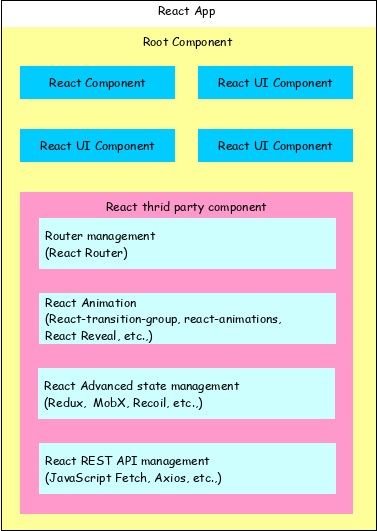
React app starts with a single root component.
Root component is build using one or more component.
Each component can be nested with other component to any level.
Composition is one of the core concepts of React library. So, each component is build by composing smaller components instead of inheriting one component from another component.
Most of the components are user interface components.
React app can include third party component for specific purpose such as routing, animation, state management, etc.
Workflow of a React application
Let us understand the workflow of a React application in this chapter by creating and analyzing a simple React application.
Open a command prompt and go to your workspace.
cd /go/to/your/workspace
Next, create a folder, static_site and change directory to newly created folder.
mkdir static_site
cd static_site
Example
Next, create a file, hello.html and write a simple React application.
<!DOCTYPE html>
<html>
   <head>
      <meta charset="UTF-8" />
      <title>React Application</title>
   </head>
   <body>
      <div id="react-app"></div>
      <script src="https://unpkg.com/react@17/umd/react.development.js" crossorigin></script>
      <script src="https://unpkg.com/react-dom@17/umd/react-dom.development.js" crossorigin></script>
      <script language="JavaScript">
         element = React.createElement('h1', {}, 'Hello React!')
         ReactDOM.render(element, document.getElementById('react-app'));
      </script>
   </body>
</html>
Next, serve the application using serve web server.
serve ./hello.html
Output
Next, open your favorite browser. Enter http://localhost:5000 in the address bar and then press enter.

Let us analyse the code and do little modification to better understand the React application.
Here, we are using two API provided by the React library.
React.createElement
Used to create React elements. It expects three parameters −
- Element tag
- Element attributes as object
- Element content - It can contain nested React element as well
ReactDOM.render
Used to render the element into the container. It expects two parameters −
- React Element OR JSX
- Root element of the webpage
Nested React element
As React.createElement allows nested React element, let us add nested element as shown below −
Example
<script language="JavaScript">
   element = React.createElement('div', {}, React.createElement('h1', {}, 'Hello React!'));
   ReactDOM.render(element, document.getElementById('react-app'));
</script>
Output
It will generate the below content −
<div><h1> Hello React!</h1></div>
Use JSX
Next, let us remove the React element entirely and introduce JSX syntax as shown below −
<!DOCTYPE html>
<html>
   <head>
      <meta charset="UTF-8" />
      <title>React Application</title>
   </head>
   <body>
      <div id="react-app"></div>
      <script src="https://unpkg.com/react@17/umd/react.development.js" crossorigin></script>
      <script src="https://unpkg.com/react-dom@17/umd/react-dom.development.js" crossorigin></script>
      <script src="https://unpkg.com/@babel/standalone/babel.min.js"></script>
      <script type="text/babel">
         ReactDOM.render(
            <div><h1>Hello React!</h1></div>,
            document.getElementById('react-app')
         );
     </script>
   </body>
</html>
Here, we have included babel to convert JSX into JavaScript and added type="text/babel" in the script tag.
<script src="https://unpkg.com/@babel/standalone/babel.min.js"></script>
<script type="text/babel">
   ...
   ...
</script>
Next, run the application and open the browser. The output of the application is as follows −

Next, let us create a new React component, Greeting and then try to use it in the webpage.
<script type="text/babel">
   function Greeting() {
      return <div><h1>Hello JSX!</h1></div>
   }
   ReactDOM.render(<Greeting />, document.getElementById('react-app') );
</script>
The result is same and as shown below −
By analyzing the application, we can visualize the workflow of the React application as shown in the below diagram.
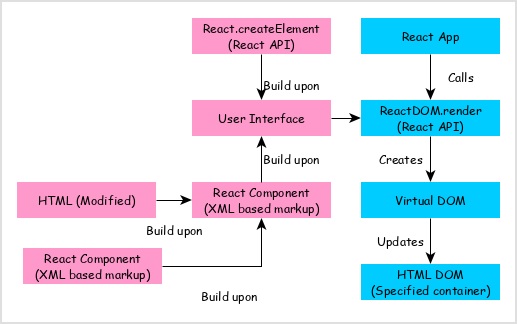
React app calls ReactDOM.render method by passing the user interface created using React component (coded in either JSX or React element format) and the container to render the user interface.
ReactDOM.render processes the JSX or React element and emits Virtual DOM.
Virtual DOM will be merged and rendered into the container.
Architecture of the React Application
React library is just UI library and it does not enforce any particular pattern to write a complex application. Developers are free to choose the design pattern of their choice. React community advocates certain design pattern. One of the patterns is Flux pattern. React library also provides lot of concepts like Higher Order component, Context, Render props, Refs etc., to write better code. React Hooks is evolving concept to do state management in big projects. Let us try to understand the high level architecture of a React application.
Comments
Post a Comment